Network Assets according to EN 18031: what they are and how to identify them
The EN 18031-1 standard builds all its requirements around the concept of "network assets." Without identifying and documenting them, it is impossible to evaluate even the first requirement. Yet the official definition is vague enough to cause confusion even among experienced technical teams.


Introduction
The EN 18031-1 standard builds all its requirements around the concept of "network assets." Without identifying and documenting them, it is impossible to evaluate even the first requirement. Yet the official definition is vague enough to cause confusion even among experienced technical teams.
In this article, we explain what network assets are, how to identify them systematically, and where RedComply comes in to automate the most laborious parts.
Network assets are one of four asset categories in EN 18031. For a high-level overview of all asset types, see our introduction to EN 18031 assets.
The basic structure: 2 macro-categories
EN 18031-1 divides network assets into two categories:
Network functions: the device features that provide or use network resources
Network function configurations: the data that defines how those functions behave
As with security assets, the two categories are interdependent. A network function without configuration does not know how to behave. A configuration without the function that uses it has no reason to exist. In documentation, they must always be presented together, with the link explicitly traced.
An immediate example: an MQTT server that manages messages between IoT devices is a network function. The configuration file that defines the listening port, authorized topics, and access credentials is a network function configuration. The documentation must show that that configuration belongs to that broker; it is not enough to list them separately.
Network Functions: 3 subcategories to help you find your way around
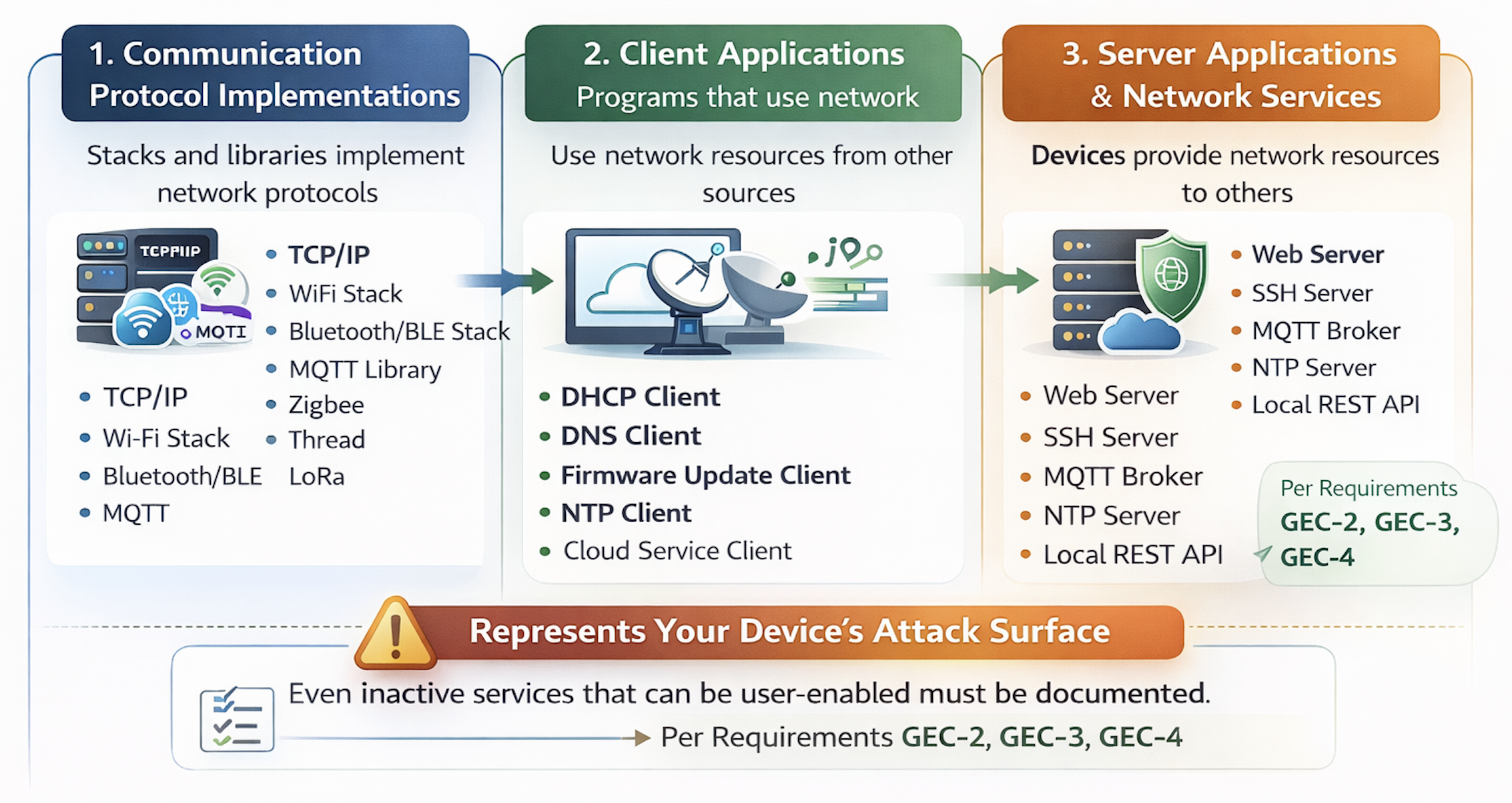
The official definition of EN 18031-1 states that a network function is "a device capability to provide or use network resources". To make it applicable, it is useful to consider three categories.
1. Communication protocol implementations
These are the network stacks and libraries that implement protocols: TCP/IP, Wi-Fi stack, Bluetooth/BLE stack, MQTT libraries, Zigbee, Thread, LoRa. Every time the device communicates over a network, it uses one of these implementations.
To identify them, start with the device's physical interfaces. Does it have Wi-Fi? There is a Wi-Fi stack. Does it have BLE? There is a BLE implementation. Does it have specific IoT protocols? There are dedicated libraries. All of these must be documented.
2. Client applications
Programs that allow the device to use network resources provided by others:
DHCP client for IP address assignment
DNS client for name resolution
NTP client for time synchronization
Client for firmware updates (contacts a remote server, downloads and applies updates)
Client for the manufacturer's proprietary cloud services
Each client is a point of interaction with the outside world and must be documented.
3. Server applications and network services
The device that provides network resources to others:
Web server for the local configuration interface
SSH server for remote administration
MQTT broker for communication between devices
NTP server for synchronizing other devices on the same network
Local REST APIs for integration with other systems
These must be identified with particular care because they represent the device's exposed attack surface. A key point: even services that are not active by default but can be enabled by the user must be documented, as required by GEC-2, GEC-3, and GEC-4 requirements.
Network Function configurations: how to identify and classify them
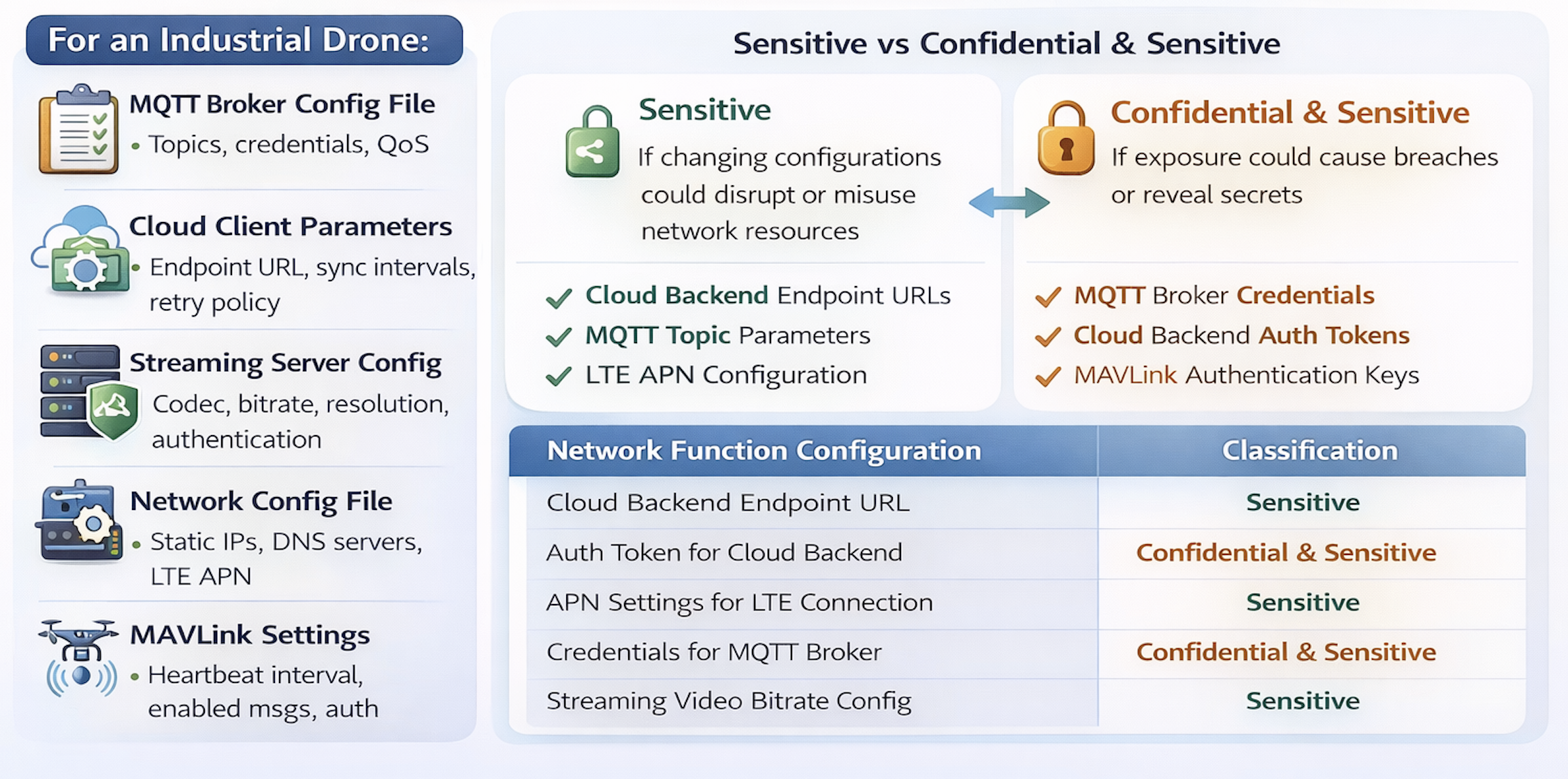
Network function configurations are the data that control the behavior of network functions. For each identified function, the associated configuration files, hardcoded parameters in the code, and user-modifiable settings must be found.
For example, in the case of an industrial drone:
MQTT broker configuration files (enabled topics, credentials, QoS)
Cloud client parameters (endpoint URL, synchronization intervals, retry policy)
Streaming server configuration (codec, bitrate, resolution, authentication)
Network configuration files (static IP addresses, DNS servers, LTE APN parameters)
MAVLink settings (heartbeat interval, enabled messages, authentication)
Sensitive vs. Confidential
Network function configurations are also classified into two categories and, as with security parameters, the classification determines which EN 18031-1 requirements apply.
Sensitive configurations: those whose modification could damage the network or lead to misuse of resources. The NTP server address, LTE network parameters, MQTT topic configuration. They are not secrets, but if someone were to alter them, the device could behave abnormally or consume network resources in an unauthorized manner.
Confidential configurations: those whose disclosure causes problems, in addition to modification. Credentials for accessing the MQTT broker, tokens for the cloud backend, keys for MAVLink authentication.
In practice: if the configuration contains credentials or keys, it is confidential. If it only controls functional behavior without secrets, it is sensitive.
| Network Function Configuration | Classification |
|---|---|
Cloud backend endpoint URL | Sensitive |
Authentication token for cloud backend | Confidential |
APN parameters for LTE connection | Sensitive |
Credentials for MQTT broker | Confidential |
Video streaming bitrate configuration | Sensitive |
Let's look at a practical example of how to fill in the Network Assets table
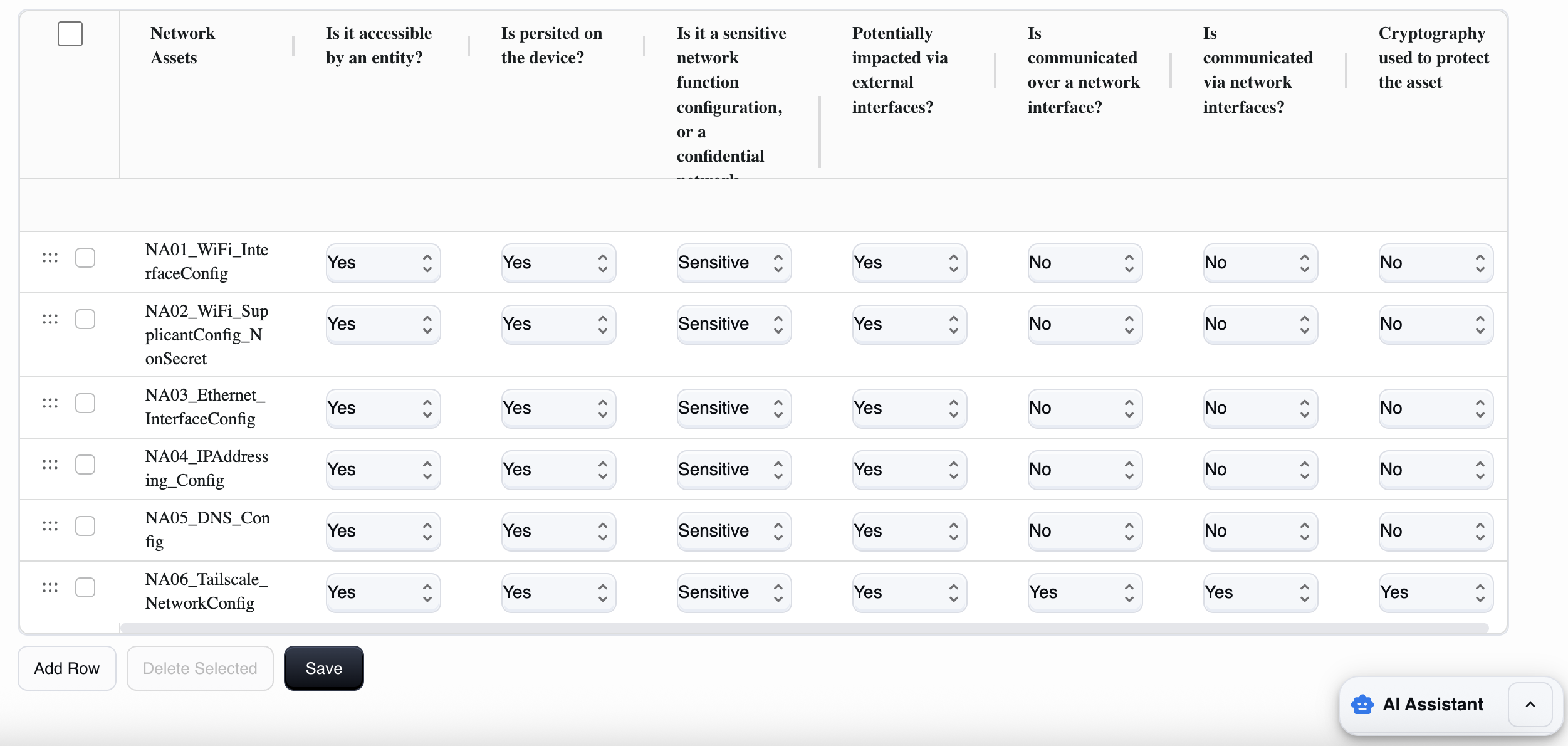
Remember that a network asset is any data, configuration, or "object" that enables or influences the network functions of the device (connection, network authentication, encryption, exposed services) and that, if read or modified, can have an impact on cybersecurity.
This Network assets table covers both network function configurations and network functions, as it:
includes network function configurations (parameters/config, often Sensitive or Confidential), and
it also includes network functions when you treat them as a censifiable "asset" (i.e., a network service/feature that can be exposed, attacked, enabled/disabled, configured).
How to fill in each field
1) asset_name (Network Assets)
Here you must give this data a clear name. It is best to use a unique and descriptive name.
For example:
NA01_WiFi_Interface,NA02_TLS_SupplicantConfig, NA03_AddrassingConfig.Avoid generic names such as "WiFi."
2) accessible_by_entity (Is it accessible by an entity?)
This field asks whether any entity (user, administrator, service, app, remote system) can read, use, or modify the asset through any channel (UI, API, SSH, file system, etc.).
Answer:
Yes: if someone can access, manage, or use it in any way.
No: if no one can access it (rare case; it would be totally internal and inaccessible).
3) persisted_on_device (Is persisted on the device?)
Asks whether the asset is persistently stored on the device.
Yes: it is saved to storage (file, database, NVRAM, config) and remains after reboot.
No: it exists only temporarily (in RAM or session) and disappears upon reboot.
4) confidential (Sensitive or Confidential network function configuration?)
Used to distinguish the "importance" of the asset:
Here you must choose between:
Sensitive: if disclosure/modification has a "high" but not necessarily catastrophic impact. For example, a configuration of ports, endpoints, network parameters that are not secret but increase the attack surface.
Confidential: if it is a secret or material that enables access, impersonation, or encryption. For example, Wi-Fi PSK, VPN credentials, and persistent tokens.
A simple rule of thumb: if it is a key/credential, then it is almost always Confidential.
5) impacted_external_if (Potentially impacted via external interfaces?)
This asks whether the asset can be read or modified via external interfaces (physical or local) of the device (USB, UART/serial, HDMI in certain architectures, etc.).
Yes: if you can influence it from those interfaces (e.g., extract config, change it, debug with file access).
No: if those interfaces do not provide a realistic way to impact it.
6) communicated_over_network_if (Is communicated over a network interface?)
Asks whether the asset is transmitted over the network (even if only as part of a protocol or exchange).
Yes: if it passes over Ethernet/Wi-Fi/Internet (e.g., tokens/cookies sent, certificates exchanged, configurations downloaded).
No: it is never sent over the network.
7) accessible_via_network_if (Is communicated via network interfaces?)
This field is used to understand how "accessible via network" the asset is and whether it can be accessed or modified:
Yes: if the asset is accessible or modifiable via network (WebUI/API/SSH/exposed service).
No: if you cannot read/modify it via network (even if the device uses it internally).
8) crypto_used (Cryptography used to protect the asset)
Asks whether the asset is protected with encryption:
in transit (e.g., TLS/SSH/VPN when communicated),
and/or at rest (encrypted file, keystore, secret storage).
Yes: if there is cryptographic protection.
No: if it is unencrypted or without cryptographic protection.
Note: "hash" (e.g., password hash) is often protection, but it is not "cryptography" in the strict sense; it depends on how you want to interpret it in the project (we can align it consistently).
Practical and repeatable procedure for each row
Define what the asset is (precise name).
List who can access it (admin/service/attacker) →
accessible_by_entity.Where it lives: persistent or runtime →
persisted_on_device.Is it secret or "only" sensitive configuration →
confidential.Can it be altered/read by physical ports →
impacted_external_if.Does it travel over the network? →
communicated_over_network_if.Is it obtainable/modifiable via the network? →
accessible_via_network_if.Is it protected by TLS/keystore/encryption? →
crypto_used.
The most common mistakes
Mistake 1: Forgetting "support" protocols
It's easy to document the main services and overlook the protocols that operate in the background: mDNS for automatic discovery, SSDP for UPnP, LLMNR, STUN/TURN for NAT traversal. These are network functions and must be documented.
Mistake 2: Not scanning the actual device
Documenting services that you think are active is not enough. Open ports in test mode, debug services not removed before production: the Notified Body will find them. Do it yourself first.
Mistake 3: Approximate classification of configurations
Configuration files with credentials classified as sensitive only lead to insufficient protection. The question to ask yourself is: does this file contain information that should not be read by third parties? If so, it is confidential.
If you are unsure where network assets end and security assets begin, our guide to security assets clarifies the boundary.
Mistake 4: Outdated documentation
You add support for a new protocol (e.g., integration with a partner cloud platform), and the documentation remains stuck at the previous version. After six months, the product on the market no longer corresponds to the certification. This is a legal risk, not just a formal one.
How RedComply manages the entire process
Identifying network assets manually on actual firmware is a task that takes weeks: analyzing the file system, scanning the network, reviewing startup scripts, searching for configurations scattered across non-standard directories.
Done manually, it takes weeks.
With our platform, you will reduce the time needed to compile this regulation by over 90%!
This is because RedComply automates the most labor-intensive parts of the process.
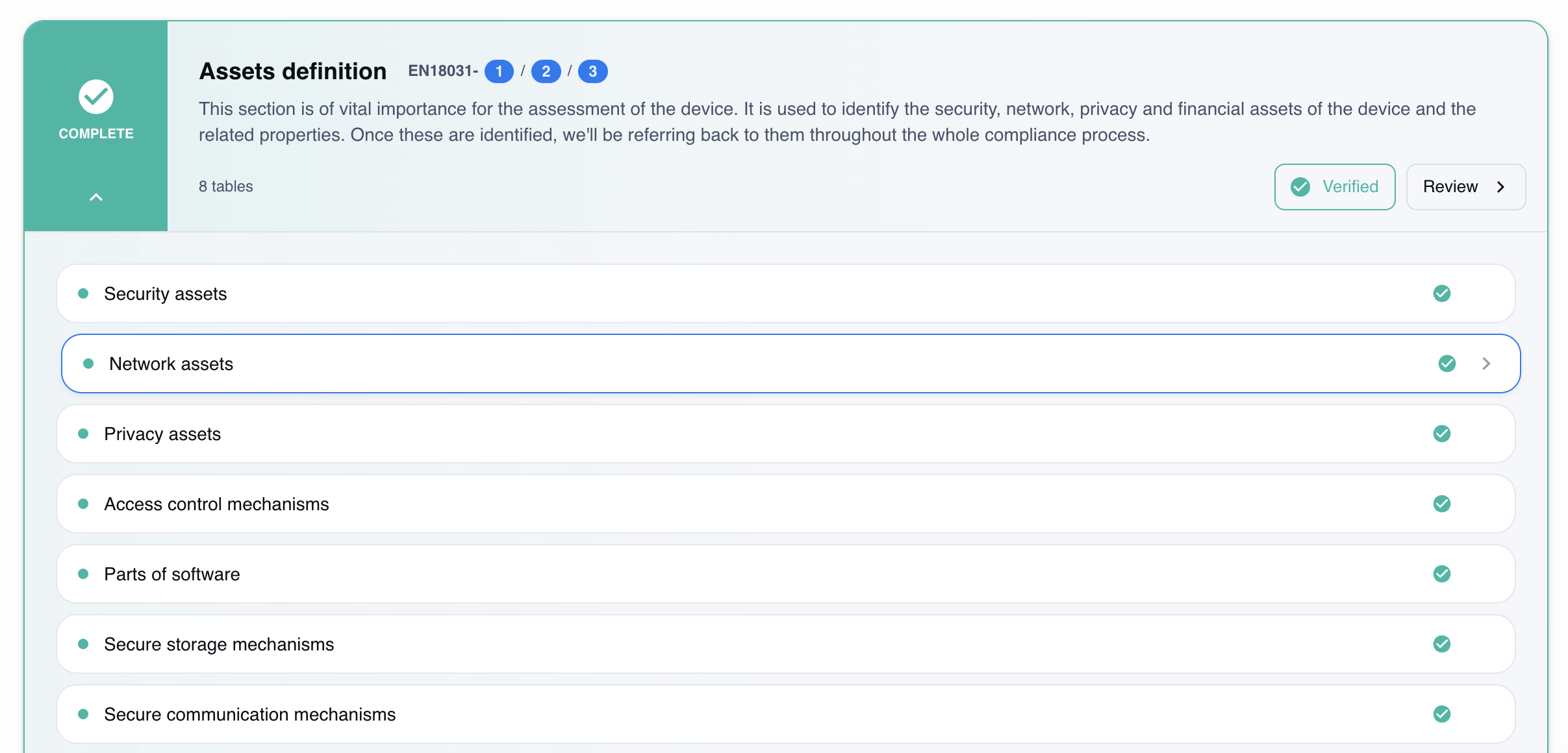
Automatic firmware analysis
Upload the firmware and the platform extracts the file system, identifies binaries and network libraries, and analyzes startup scripts to understand which services are activated at boot time. The result is a list of candidate network functions, already organized by category.
Configuration identification
The system scans the file system in standard directories (/etc/config, /etc/network, /var/www/config, scripts in /etc/init.d) and in non-standard directories detected by script analysis. Each configuration file found is linked to the network function that uses it.
Classification and reporting of gaps
For each network function and configuration identified, the platform:
Proposes sensitive/confidential classification
Reports library versions with known CVEs
Identifies undocumented exposed services
Verifies consistency with GEC-2, GEC-3, and GEC-4 requirements
Version tracking
With each firmware update, RedComply compares the new version with the previous one and detects:
New network functions introduced
Modified or added configurations
New exposed services
Changes in the compliance profile
Where to Start
As of August 1, 2025, RED compliance has become mandatory for IoT devices with radio interfaces. Network assets must be identified before any EN 18031-1 requirements can be assessed.
RedComply speeds up the compilation of security and all RED regulations by over 90%.
Upload your firmware and get an initial automatic mapping of your network assets in just a few days.
Request a demo and our team will contact you to help you!
RedComply reduces EN 18031 compliance time by over 90%. Learn more at redcomply.com.