Privacy Assets according to EN 18031: what they are and how to identify them
The EN 18031-2 standard refers to privacy assets as if they were an obvious concept, but in practice the official definitions are vague and lack concrete examples. As a result, many manufacturers get stuck in the early stages of documentation, without really understanding where to start.


Introduction
The EN 18031-2 standard refers to privacy assets as if they were an obvious concept, but in practice the official definitions are vague and lack concrete examples. As a result, many manufacturers get stuck in the early stages of documentation, without really understanding where to start.
In this article, we explain what privacy assets are, how to find them in your device, and how RedComply automates much of this work.
Privacy assets are one of the four EN 18031 asset categories. For the complete picture, see our overview of all asset types.
What are Privacy Assets?
Privacy assets are all the components of your device that process users' personal data.
The EN 18031-2 standard divides them into three categories, which should not be seen as separate elements but as links in the same chain.
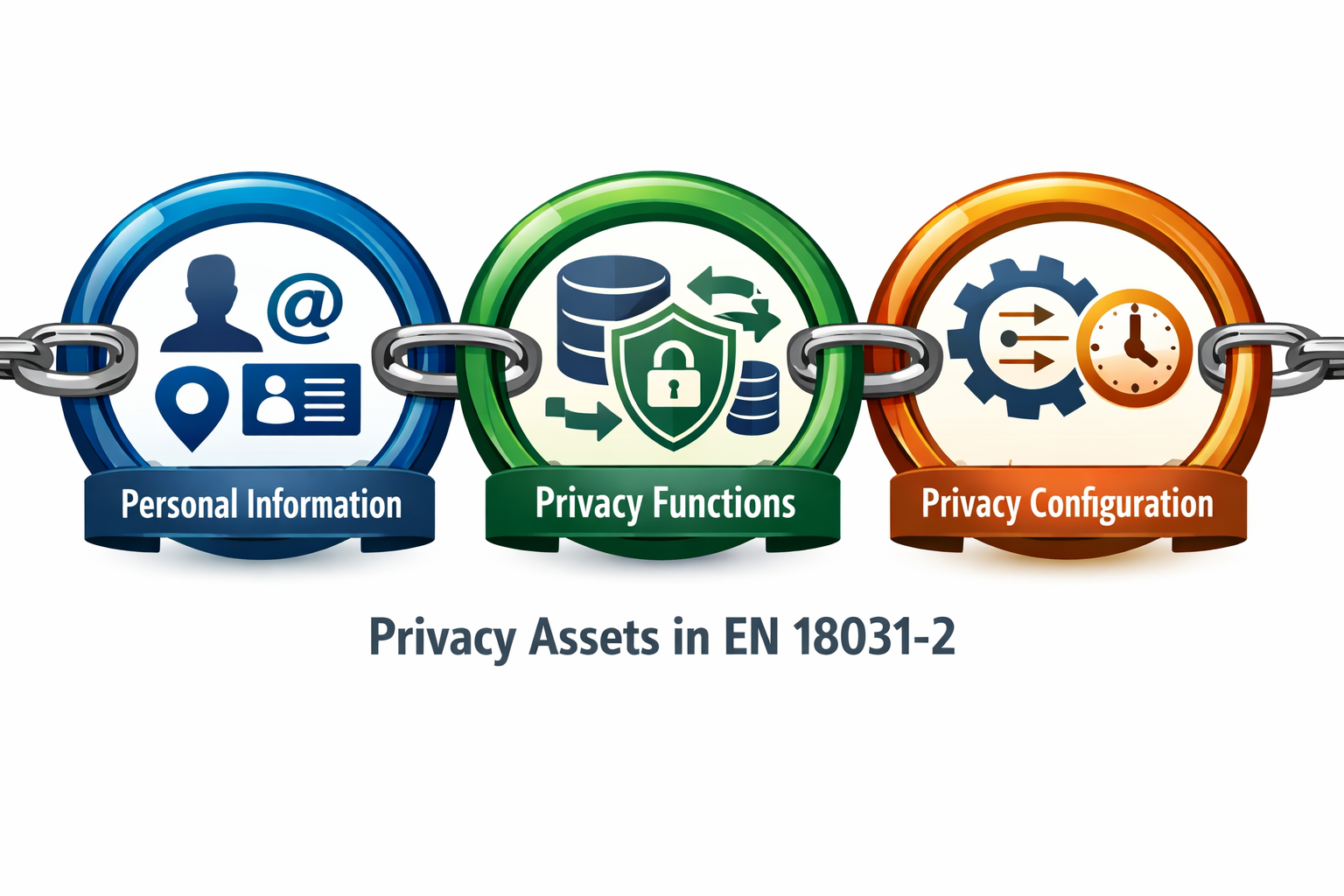
1. Personal information
All data that identifies or can identify a user: name, email address, GPS location, usage patterns, activity history. If data is personal under the GDPR, it is a privacy asset under EN 18031-2. The boundary is the same.
2. Privacy functions
The device features that process that information: collection, storage, transmission, modification, deletion. Any operation on personal data is performed by a privacy function.
3. Privacy function configurations
The parameters that define how those functions behave:
How often do they synchronize data?
How long do they keep it before deleting it?
Can the user change these parameters?
The relationship between the three elements is what the standard requires to be documented. It is not enough to list them: you have to show how they connect. Personal information is processed by privacy functions, whose behavior is defined by their configurations.
How to identify privacy assets on your device
The starting point is always the same question: What personal data passes through my device?
Once you have defined the list, trace the complete path for each piece of personal data:
Where does it come from? Physical sensor, user input, external API?
How is it processed? On the device, in the cloud, or both?
Where is it stored? Local memory, remote database?
Who can access it? Only the user, the manufacturer, third parties?
This exercise is often more revealing than expected. Many teams discover data flows they were unaware of:
Analytics SDKs that collect behavioral data
Crash reporting libraries with stack traces containing personal information
Integrations with third-party services that retain data longer than expected
These "hidden" flows are often the most critical from a compliance perspective, precisely because no one designed them with privacy in mind.
Once you have mapped the flows, identify the functions that manage them and document for each one:
What exactly it does with that data (collection, transformation, transmission, storage)
Dependencies with other components of the system
The configurations: default values, permitted ranges, user modifiability
The EN 18031-2 standard does not impose a specific level of granularity, so you can group similar elements together.
But grouping too much is one of the most frequent mistakes: the granularity must be sufficient to make it clear to the Notified Body that you have really analyzed the system, not just superficially.
Let's look at a practical example of how to fill in the Privacy Assets table
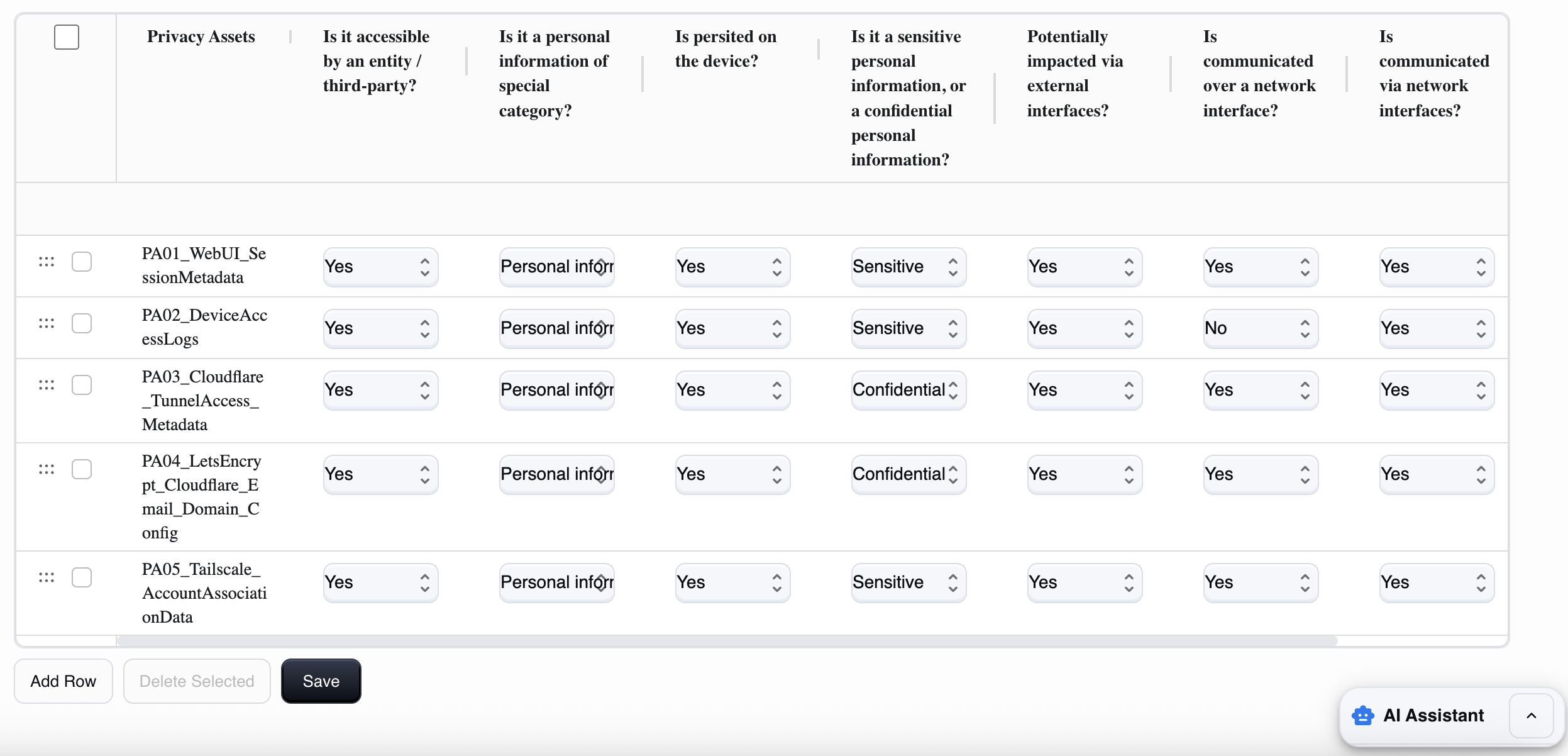
The Privacy assets table is like a sort of inventory of data that has an impact on privacy processed by the device (personal data, identifiers, logs that can identify, images/videos/audio, etc.) and their properties. These include, for example, who can access them, whether they are "special category" data, where they are stored, whether they travel over the network, or whether they are protected by encryption.
How to fill in each field
1) Privacy Assets (asset_name)
Here you must give this data a clear name. It is best to use a unique and descriptive name.
For example:
PA01_UserEmail,PA02_DeviceSerialLinkedToAccount,PA03_AccessLogs_WithIP.Avoid generic names
2) Is it accessible by an entity / third-party? (accessible_by_entity)
This field asks whether an entity (user/admin), a third party (cloud/app/provider), or a potential attacker can read, obtain, or modify that data through any means (UI, API, file, debug, network).
Yes: if there is at least one access path (even legitimate, e.g., the user sees their data).
No: if it is not accessible to anyone (rare case; data is only internal and not exposed).
3) Is it a personal information of special category? (special_category)
This field is used to classify the type of personal data involved, and you must choose between:
Personal information: if it is "normal" personal data (email, name, associated IP, account identifiers, user logs, etc.).
Special category: if it is data for special categories (in the sense of GDPR Art. 9: health, biometric for identification, ethnicity, political opinions, religion, sex life, etc.). In many IoT products, this is rarely applicable.
Not applicable: if it is not personal data (e.g., a technical value not attributable to a person).
Rule of thumb: if the data can directly or indirectly identify a person → at least Personal information.
4) Is persisted on the device? (persisted_on_device)
This field asks whether the asset is persistently stored on the device.
Yes: if it is a file, database, disk log, or configuration that remains after reboot.
No: if it is only in RAM or temporary (e.g., an ephemeral token, unrecorded video frames).
5) Is it sensitive personal information, or confidential personal information? (confidential)
Here you must choose between:
Sensitive: if it is personal data that deserves high protection but is not necessarily a "secret" (e.g., logs with IP/user actions, identifiers, metadata).
Confidential: if it is data that, if disclosed, enables access or causes serious impact (e.g., passwords, session tokens, 2FA secrets, recovery keys, highly confidential user data, private recordings).
Rule of thumb: credentials/tokens/2FA → Confidential.
6) Potentially impacted via external interfaces? (impacted_external_if)
Whether the data can be read, extracted, or modified via non-network external interfaces (USB, UART/serial, physical access to storage, console, etc.).
Yes: if physical access or access via those ports allows you to reach the logs/files/configs that contain it.
No: if there is no realistic path via external interfaces.
7) Is communicated over a network interface? (communicated_over_network_if)
If the data is transmitted over a network (LAN/Internet) in some form:
to apps/web browsers,
to the cloud,
to a remote service,
or as part of a protocol. Yes/No accordingly.
8) Is communicated via network interfaces? (accessible_via_network_if)
This field is used to understand how "network-accessible" the asset is and whether it can be accessed or modified:
Yes: the data is accessible/retrievable via the network (API/WebUI/streaming/download).
No: it cannot be obtained via the network (even if it may exist locally).
9) Cryptography used to protect the asset? (`crypto_used`)
Asks whether the asset is protected with encryption:
in transit: TLS/HTTPS, SSH, VPN.
at rest: encrypted filesystem, encrypted database, keystore/secret storage. Select Yes if at least one cryptographic protection is applied where needed, otherwise select No.
Mini-checklist for accurate completion (without ambiguity)
For each privacy asset, you must mentally note the following points:
What data it is and whether it identifies a person.
Who sees it (user/admin/third parties).
Where it is located (RAM or disk/log).
How it communicates with the outside world (network? physical interfaces?).
How it is protected (TLS, encryption at rest, access control).
The most common mistakes
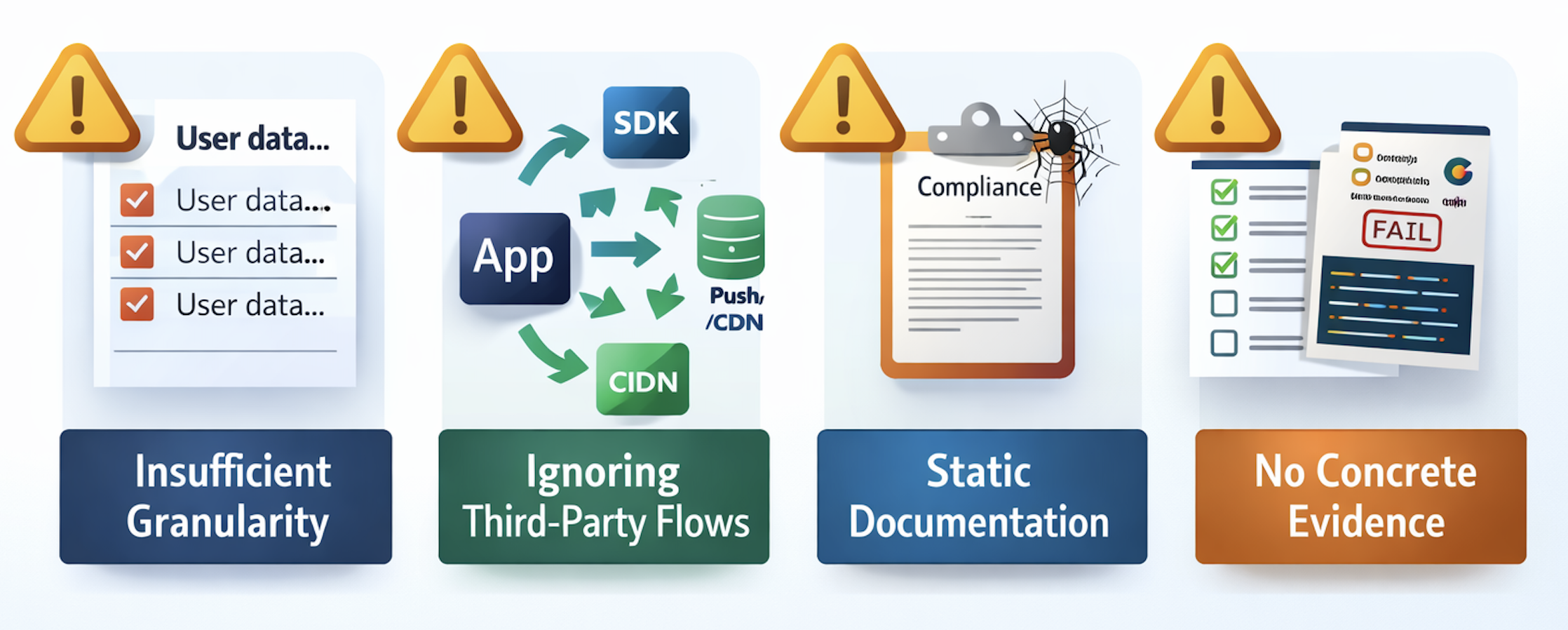
Mistake #1: Insufficient granularity
Writing "the app manages user data" is not enough. The standard requires specificity: what data, where, how, why.
Each type of personal data must be identified separately, because each type has its own level of sensitivity and requires different protection measures.
Mistake #2: Ignoring flows to third parties
Most manufacturers focus on the data they collect directly, forgetting:
Analytics SDKs
Crash reporting libraries
CDNs and push notification services
Integrations with payment processors or voice assistants
All of these elements collect data on their own. These are also privacy assets that need to be documented. They are often the most problematic, precisely because no one considered them during the design phase.
Mistake #3: Static documentation
The documentation is perfect at launch, but then the product evolves and the documentation remains unchanged.
New firmware introduces a feature that collects data differently, but no one updates the compliance documentation. The result: after six months, the product on the market no longer complies with the certification obtained.
This is a real legal and commercial risk, not a theoretical issue to be underestimated.
Error #4: No concrete evidence
Writing "data is end-to-end encrypted" is useless without proof. Notified Bodies want to see:
Screenshots of configurations
Code snippets
Penetration test reports
Without evidence, documentation is just a list of intentions.
How RedComply manages all this
Doing this work manually requires weeks of coordination between different teams (development, security, product), and it's easy to miss something.
Done manually, it takes weeks.
With our platform, you'll reduce the time it takes to compile this regulation by over 90%!
That's because RedComply automates the most labor-intensive parts of the process.
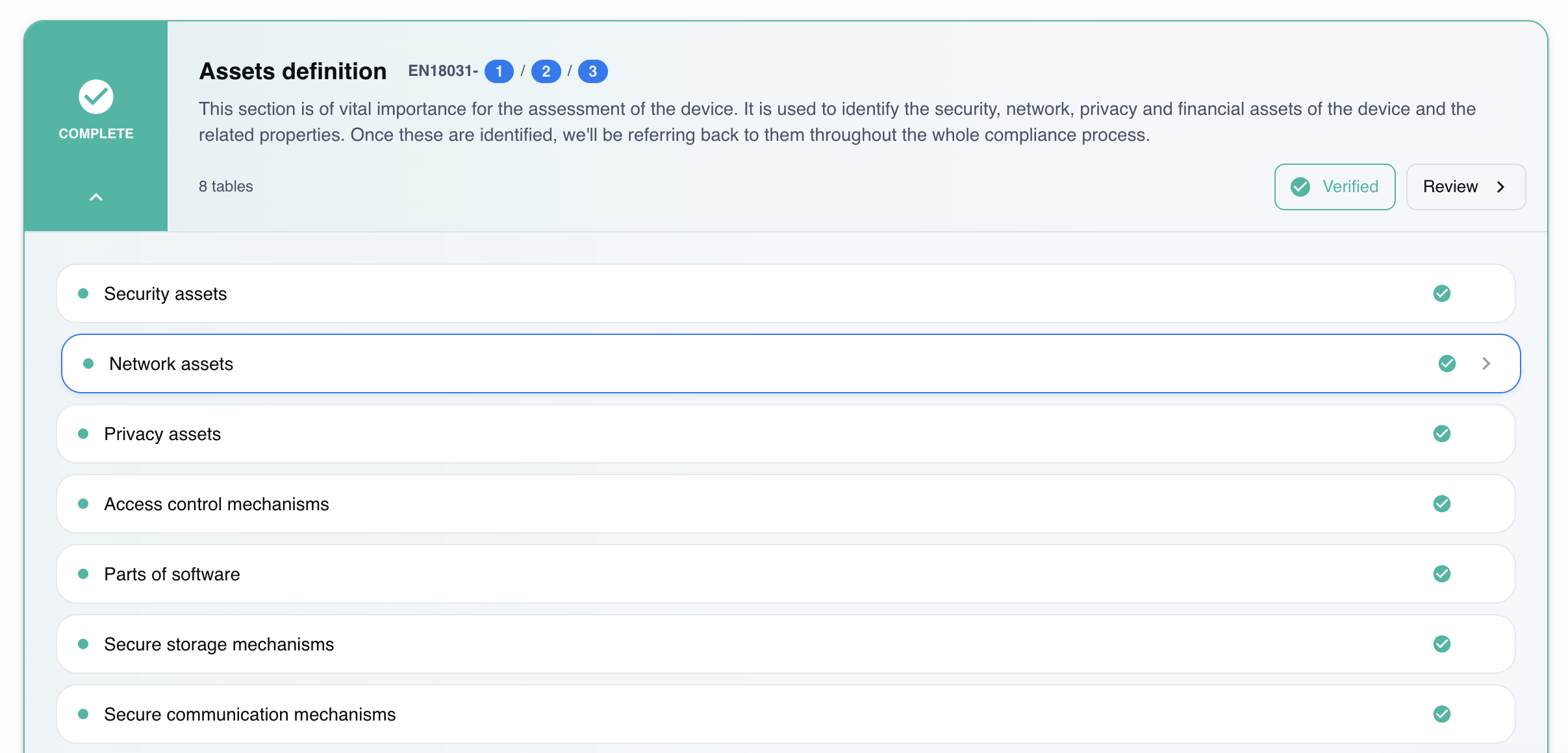
Automatic mapping
Upload existing technical documentation (specifications, diagrams, source code) and the system automatically identifies privacy assets. The result is a list of privacy functions organized by category.
Risk analysis
For each identified privacy asset, the platform evaluates:
Adequacy of encryption in transit and at rest
Risky default configurations
Undocumented flows to third-party services
Gaps in relation to the specific requirements of EN 18031-2
Version tracking
With each firmware update, RedComply automatically compares the new version with the previous one and detects:
New privacy assets introduced
Changes to existing configurations
Changes in the risk profile
The documentation remains aligned with the actual product, without having to start from scratch with each release.
Documentation export
The final documentation is generated in the format required by EN 18031-2, ready for the Notified Body. No templates to fill out by hand, no manual formatting.
The link with Security and Network Assets
Privacy assets are not an isolated chapter of EN 18031. They are closely linked to the other two types of assets, and ignoring these relationships is a costly mistake.
- Security assets protect privacy assets: TLS encryption protects data in transit, while controlled access mechanisms limit who can read it at rest. Without adequate security assets, privacy assets remain exposed regardless of how well documented they are.
- Network assets transport privacy assets: personal data travels through the device's network interfaces. An unprotected communication channel is a problem for both EN 18031-1 and EN 18031-2.
For a detailed guide on identifying the security assets that protect your privacy data, see our security assets article.
Where to start
As of August 1, 2025, RED compliance has become mandatory for IoT devices with radio interfaces. Privacy assets must be identified before any EN 18031-1 requirements can be assessed.
RedComply speeds up the compilation of security and all RED regulations by over 90%.
Upload your firmware and get an initial automatic mapping of privacy assets in just a few days.
Request a demo and our team will contact you to help you!
RedComply reduces EN 18031 compliance time by over 90%. Learn more at redcomply.com.