Security Assets according to EN 18031: what they are and how to identify them
Security assets are the mandatory starting point for any EN 18031 compliance work. Without identifying them, it is impossible to know which requirements apply to your device (which means you cannot even begin to write the Technical Documentation).


Introduction
Security assets are the mandatory starting point for any EN 18031 compliance work. Without identifying them, it is impossible to know which requirements apply to your device (which means you cannot even begin to write the Technical Documentation).
Yet the definitions in the standard are often too abstract to be directly applicable. In this article, we explain what security assets are, how to find them methodically, and how RedComply automates the most laborious parts of the process.
Security assets are one of four asset categories defined by EN 18031. For a broader overview of all asset types, see our introduction to assets in EN 18031.
The basic structure: 2 categories
EN 18031 divides security assets into two categories:
Security functions: the device features that implement security measures
Security parameters: the data that defines how those functions behave
These two categories are not independent.
A security parameter without the function that uses it is meaningless.
A security function without its parameters does not know how to behave.
In the documentation, they must always appear together, with the link explicitly traced.
A direct example: a web server that uses HTTPS is a security function. The TLS certificate and private key it uses to encrypt communications are security parameters. The documentation must show that that certificate belongs to that server; it is not enough to list the two elements separately.
Security Functions: what they are and how to find them
A security function is any device feature that serves a protective purpose.
The standard defines them differently depending on the area of application (EN 18031-1 covers network protection, EN 18031-2 covers personal data, and EN 18031-3 covers financial data), but the underlying concept is the same: features that protect something.
Typical security objectives that security functions must cover:
Protecting the device from unauthorized access (firewall, authentication, access control)
Ensuring data integrity and authenticity (digital signatures, firmware update verification)
Protecting the confidentiality of communications (encryption in transit and at rest)
To identify them in your device, it is best to think in terms of four categories.
1. Cryptographic libraries and implementations
These are software libraries that enable the device to use cryptographic algorithms: OpenSSL, Mbed TLS, wolfSSL, and similar. Whenever the device encrypts data, verifies a signature, or establishes a TLS connection, it does so through one of these libraries. They must always be documented, even when they appear to be "implicit."
A fundamental rule: always use recognized and actively maintained libraries, never homemade cryptographic implementations.
Cryptography is an area where seemingly small errors invalidate the entire protection.
2. Security-related client applications
Programs that allow the device to use network security services: SSH clients for secure connections to remote systems, VPN clients, clients for downloading and verifying firmware updates.
3. Server applications and services
The device that exposes security services to others: SSH servers for remote administration, HTTPS servers for the web configuration interface, authentication daemons. These must be identified with particular care because they represent the exposed attack surface of the device.
Security parameters: what they are and how to find them
A security parameter is data that determines the behavior of a security function (not the function itself).
The standard defines it as "data... that defines the behavior of the equipment's security function."
The standard distinguishes three classes:
Sensitive: if manipulated, it can cause damage.
Confidential: if disclosed, it can cause damage.
Public: sensitive but not confidential (it can be known, but not altered in a dangerous way).
Confidential cryptographic keys are a special case, however, because they are confidential keys used in cryptographic protocols and algorithms.
To identify them on your device, it is best to think in terms of four categories.
1) Runtime configuration parameters
These are "things" that are set via UI, API, config files, and cloud configuration, such as password policies, lockouts, ACLs, exposed services, and session timeouts.
They are typically sensitive because changing them weakens protection.
2) Communication and encryption parameters
TLS, DTLS versions and cipher suites, CA trust stores, certificate validation, pinning, curves/lengths, OCSP/CRL policies. Many of these are public but sensitive, meaning they are known but must not be altered.
3) Lifecycle parameters (boot/update/hardening)
Update policy (such as mandatory signing, anti-rollback, channels), secure boot settings, set of updatable components, default services.
It is important to note that factory defaults matter.
4) Embedded parameters (hard-coded/build-time/provisioning)
Values within firmware, pipelines, and provisioning, such as fixed endpoints, compiled feature flags, debug mode, default role/policy.
Sensitive vs. Confidential
Each security parameter must be classified, and this classification directly determines which EN 18031 requirements apply.
Sensitive parameters (SSP): those whose modification would compromise security. A public certificate is not secret, but if it were replaced with a fake one, the entire chain of trust would collapse. They require integrity protection.
Confidential parameters (CSP): those whose disclosure would compromise security. Private keys, passwords, tokens, credential hashes. They require both confidentiality and integrity protection.
In practice: if a parameter must remain secret, it is confidential.
It cannot be classified as confidential only (if confidentiality matters, integrity matters too).
| Security Parameter | Classification |
|---|---|
TLS private key for cloud communications | Confidential |
Cloud server public certificate | Sensitive |
Fingerprint hash | Confidential |
Access token for HomeKit integration | Confidential |
Access rule configuration file | Sensitive |
The classification has immediate practical consequences. If a parameter is confidential and is stored persistently, the SSM-3 requirement stipulates that the storage must protect its confidentiality, which excludes saving it in plain text in a text file.
Let's look at a practical example of how to compile the Security Assets table
Now let's analyze specifically how the Security Assets table can be compiled, taking as an example the compilation of an electronic card connected to the network via WiFi.
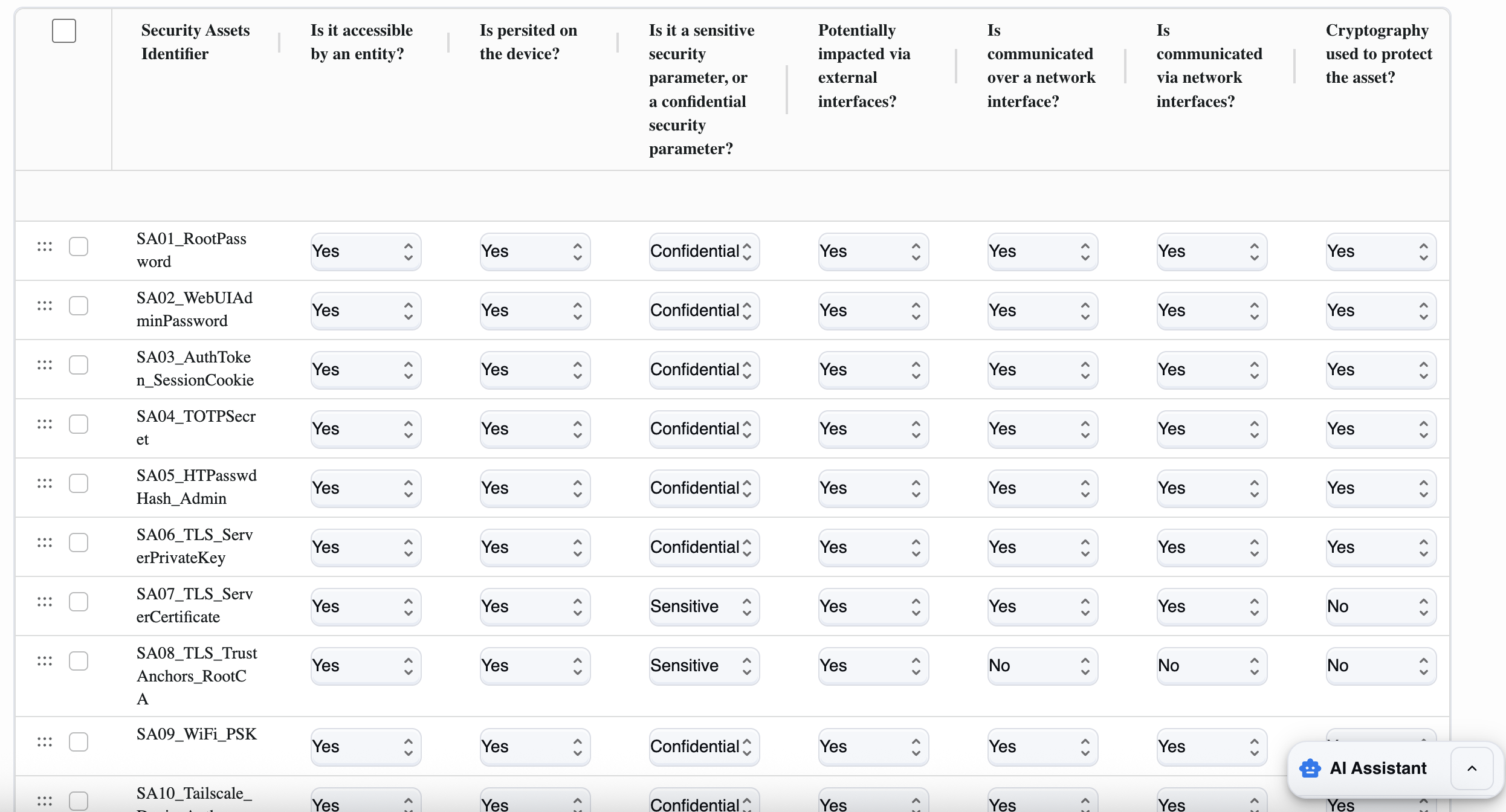
Let us remember that security assets (in EN 18031) are the parts of the design that enable device security: primarily security parameters (passwords, keys, tokens, rights/ACLs, security configurations) and, in general, information or objects used by security functions to protect other assets.
The standard describes them as follows:
A Confidential Security Parameter (CSP) is secret security information: if disclosed, it compromises security (typical examples: PINs/passwords, symmetric cryptographic keys, private keys).
A Sensitive Security Parameter (SSP) is security information that, if manipulated, can compromise security (examples: access rights, parameters that regulate permissions/policies; some keys also fall into this category).
There is also the concept of public security parameters: sensitive but not confidential (e.g., public keys).
(EN 18031 repeats this definition in several places; e.g., EN 18031-1 Annex A and EN 18031-3 Annex A.)
Concrete examples of security assets in a product:
root/admin passwords, password hashes, 2FA secrets (TOTP),
session tokens/cookies,
TLS/SSH private keys, VPN credentials,
configurations that enable/disable security controls (policies, ACLs, security override files).
How to fill in each field
To fill in the Security assets table, you need to do two things:
1) list and describe each relevant security asset
2) for each one, indicate how it can be accessed (entity, network, external interfaces), where it resides (persistent or not), and whether it is protected (encryption).
Below, we explain both the procedure and the meaning of each column.
Before we begin, let's establish some general rules. For each line, and therefore for each asset, we must:
Give it a unique name (e.g.,
SA06_TLS_ServerPrivateKey).Decide whether the asset is accessible by any entity (admin/user/process/attacker with a realistic path).
Indicate whether it is persistent (saved to storage) or only temporary.
Classify whether it is Sensitive or Confidential (almost always "Confidential" if it is a secret).
Assess whether it can be impacted via external interfaces (USB/UART/physical console).
Assess whether it is communicated over the network and/or whether it is accessible via the network.
Indicate whether there is encryption to protect it (in transit and/or at rest).
1) Security Assets Identifier (asset_name)
Here you must give this data a clear name. It is best to use a unique and descriptive name.
For example:
SA01_RootPassword,SA06_TLS_ServerPrivateKey,SA03_AuthToken_SessionCookie.Avoid generic names.
2) Is it accessible by an entity? (accessible_by_entity)
This field asks whether any entity (user, administrator, service, app, remote system, or even a realistic attacker) can read, use, or modify the asset through any channel (UI, API, SSH, file system, etc.).
Yes: if the admin or user can access it (UI/API/SSH), a process uses it, or an attacker could obtain it through a realistic path (network or physical).
No: only if no one can access it (rare case).
3) Is persisted on the device? (persisted_on_device)
Asks whether the asset is stored and remains after reboot.
Yes: if files/config/DB/keystore are on storage.
No: if only in RAM or temporary (e.g., short-lived ephemeral token not saved).
4) Is it a sensitive... or a confidential... security parameter? (confidential)
This is used to distinguish the "importance" of the asset:
Here you must choose between:
Confidential: if it is data that must be kept secret (password, token, private key, PSK).
Sensitive: if it is not necessarily secret, but if manipulated it compromises security (e.g., rights/ACL/policy, public keys, or non-secret but critical parameters).
Rule of thumb: credentials/private keys/PSK/persistent tokens → Confidential.
5) Potentially impacted via external interfaces? (impacted_external_if)
Asks whether the asset can be read or modified via non-network external interfaces (USB, UART/serial, console, physical access to storage).
Yes: if physical access or console access can be used to reach the file/keystore/config that contains it.
No: if there is no realistic path via those interfaces.
6) Is communicated over a network interface? (communicated_over_network_if)
Asks whether the asset is transmitted over a network (even if only as part of a protocol or exchange).
Yes: if it passes over Ethernet/Wi‑Fi/Internet (e.g., tokens/cookies sent, certificates exchanged, configurations downloaded).
No: it is never transmitted over the network.
7) Is communicated via network interfaces? (accessible_via_network_if)
This field is used to understand how "reachable via the network" the asset is and whether it can be accessed or modified:
Yes: if via network you can obtain or influence the asset (e.g., download config, API that exposes it, endpoint that uses it and is therefore attackable).
No: cannot be obtained/influenced directly via the network.
8) Cryptography used to protect the asset? (crypto_used)
Asks whether the asset is protected with encryption:
in transit (TLS/SSH/VPN),
and/or at rest (encrypted file, keystore, disk encryption). Select Yes if there is adequate cryptographic protection, otherwise select No.
The most common mistakes
Mistake #1: Not documenting cryptographic libraries Many teams focus on visible services and overlook the underlying libraries. Then, when CRY-1 or CCK-1/2/3 requirements come along, they don't have the necessary information. Cryptographic libraries should always be documented, including the specific version.
Mistake #2: Not checking the services that are actually exposed Documenting the services that should be active is not enough. Ports left open in test mode, debug services not disabled before release.
The Notified Body will scan the network and if it finds an undocumented service, certification will be blocked. Scan with Nmap yourself before delivery.
Mistake #3: Incorrect classification of parameters Confidential parameters classified only as sensitive lead to the application of incorrect requirements and leave real security gaps. The question is simple: if someone read this parameter, would there be a security problem? If so, it is confidential.
Mistake #4: Inconsistent granularity Some functions are documented in detail, others are grouped into huge blocks. The standard allows freedom in terms of granularity, but consistency is essential. A practical criterion: group security parameters that use the same protection mechanism and belong to the same security function.
How RedComply manages the entire process
Identifying security assets on actual firmware requires specific skills: binary analysis, network scanning, startup script review, dependency mapping.
Done manually, it takes weeks.
With our platform, you will reduce the time needed to comply with this regulation by over 90%!
This is because RedComply automates the most labor-intensive parts of the process.
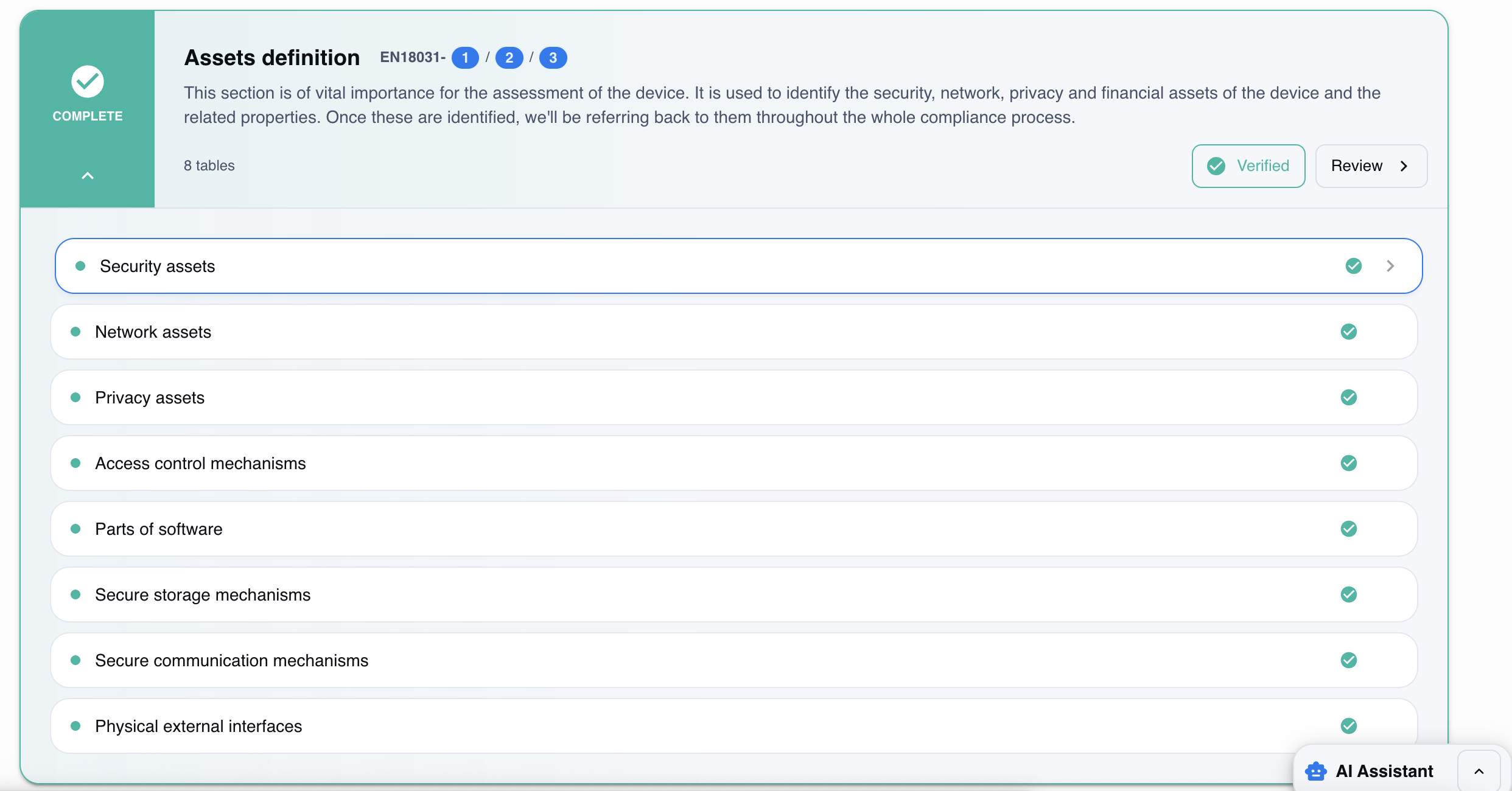
Automatic mapping
Upload existing technical documentation (specifications, diagrams, source code) and the system automatically identifies security assets. The result is a list of security functions organized by category.
Identification of security parameters
For each security asset identified, the platform evaluates:
Cryptographic keys and certificates
Security service configuration files
Password or credential hashes
Patterns indicating the presence of cryptographic material
Each item found is linked to the security function that uses it.
Risk classification and analysis
The system automatically proposes a sensitive/confidential classification for each parameter, reports gaps in relation to EN 18031 requirements, and suggests prioritized mitigation measures.
Version tracking
With each firmware update, RedComply compares the new version with the previous one and detects:
New security functions introduced
Security parameters modified or added
Changes in the risk profile
Where to start
As of August 1, 2025, RED compliance has become mandatory for IoT devices with radio interfaces. Security assets must be identified before any other section of the Technical Documentation.
Once your security assets are documented, the next step is the full risk assessment process for RED compliance.
RedComply speeds up the compilation of security and all RED regulations by over 90%.
Upload your firmware and get an initial automatic mapping of security assets in just a few days.
Request a demo and our team will contact you to help you!
RedComply reduces EN 18031 compliance time by over 90%. Learn more at redcomply.com.